SecureBootCertChecker
This tool checks whether the updates to the 2023 SecureBoot certificate were successfully applied.
Downloads

What is this tool for?
The SecureBootCertChecker allows you to check your system (direct Administrator-Account required) for the new 2023 SecureBoot certificate and update it if necessary. The new certificate not only allows your system to block the old certificate (2011) and thus close the critical security vulnerability CVE-2023-24932 (BlackLotus UEFI Bootkit) after the corresponding Windows update, but also to install new security patches after June 2026 (when the old certificate expires). Troubleshooting must be performed manually: Help is available in the Troubleshooting section.
What does this tool not do?
While the tool allows you to check/update the SecureBoot DB, the boot manager, and the KEK (Key Exchange Key) -> compatibility with the new certificate; it only indirectly updates the SecureBoot-DBX -> blocking the old certificate. The SecureBoot-DBX update is rolled out via Windows Update by Microsoft once your system is ready for it. Only once the SecureBoot-DBX has been updated is the CVE-2023-24932 vulnerability closed (explanation: An attacker can, for example, replace the boot manager with an older version, since your system still trusts the old certificate before the SecureBoot-DBX update).
How can I tell if a system is secure?
The easiest way is to check the device security settings:
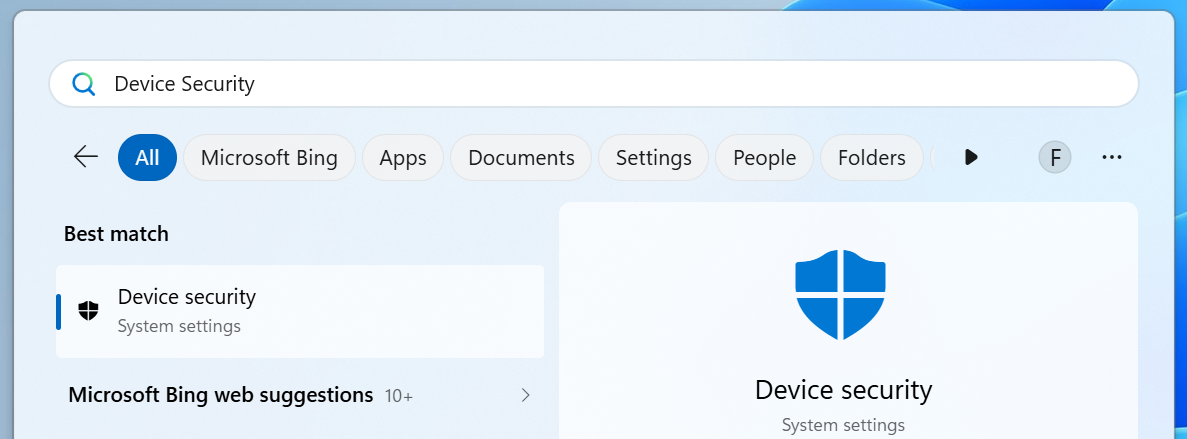
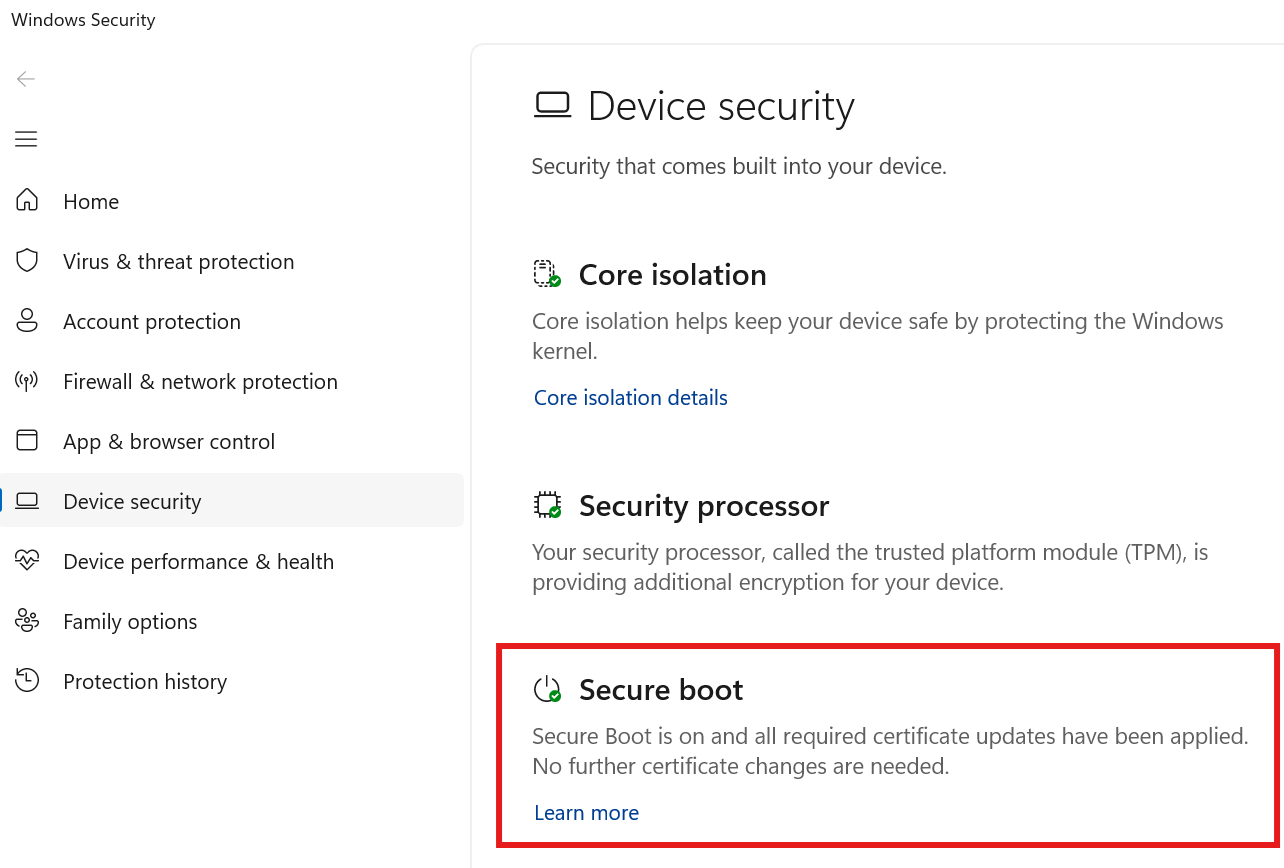
Alternatively, you can go to the Security settings and select Device security there.
The meaning of the visual interface
The tool simplifies access to the information, provides more details, and allows you to initiate the update process. In the simplified view after launching the tool:
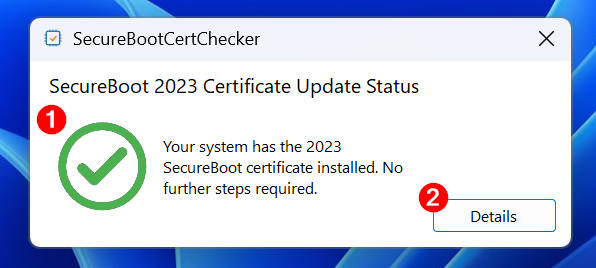
- Certificate Status: Indicates whether the new 2023 SecureBoot certificates have been applied.
- Details: Button that takes you to the detailed view.
In the detailed view after clicking
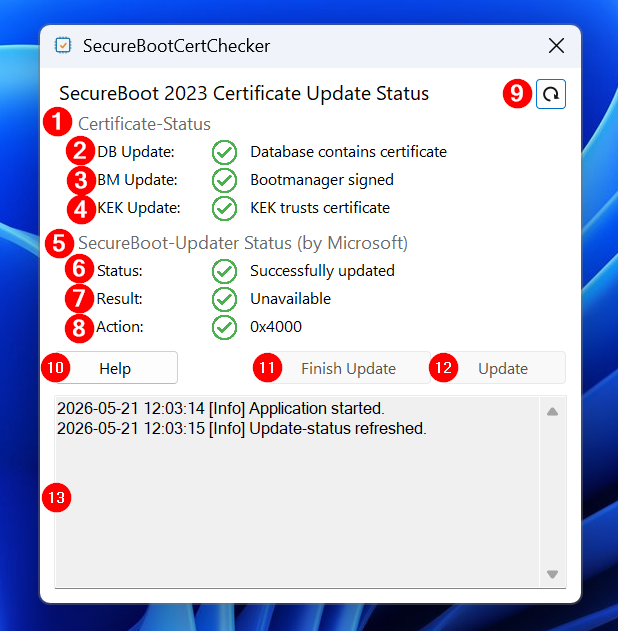
- Certificate Status: Section containing indicators for key SecureBoot components.
- DB Update: Indicator showing whether the new UEFI certificate (Windows UEFI CA 2023) has been added to the SecureBoot database.
- BM Update: Indicator showing whether the boot manager and boot loader have been signed with the new UEFI certificate (Windows UEFI CA 2023).
- KEK Update: Indicator showing whether the new KEK certificate (Microsoft KEK 2K CA 2023) has been added to the firmware.
- SecureBoot Updater Status (by Microsoft): Section with indicators showing the status of the Windows-integrated task “Microsoft\Windows\PI\Secure-Boot-Update”.
- Status: Indicator showing the current status of the 2023 SecureBoot update.
- Result: Indicator showing whether an error has occurred. If so, an error code is also displayed. Note: Error code 0x8007015E stands for “Restart required” and therefore does not represent a direct error.
- Action: Indicator displaying a code that represents the pending processes of the SecureBoot update. For more information, see the Troubleshooting section.
- Refresh: Button that allows you to manually refresh the indicators.
- Help: Button that takes you to this help page.
- Finish Update: Button that allows you to directly complete the update initiated by this tool after the restart. Otherwise, the update will be automatically completed by the task integrated into Windows.
- Update: Button that allows you to initiate the update. Note: This requires that the status (indicator 6.) corresponds to the state “Update not run yet.”
- Log: Text field that displays additional information and errors.
What does this tool call?
The tool follows the official Microsoft guide and uses the Windows-integrated task ”Microsoft\Windows\PI\Secure-Boot-Update" to update the certificate. This task typically starts automatically every 12 hours, but is launched manually by the tool in the event of an update. The following registry keys are used:
- Status = HKEY_LOCAL_MACHINE\SYSTEM\CurrentControlSet\Control\Secureboot\Servicing\UEFICA2023Status
- Result = HKEY_LOCAL_MACHINE\SYSTEM\CurrentControlSet\Control\Secureboot\Servicing\UEFICA2023Error
- Action = HKEY_LOCAL_MACHINE\SYSTEM\CurrentControlSet\Control\Secureboot\AvailableUpdates
The tool also checks the certificate status of the following SecureBoot components:
- SecureBoot DB (using Get-SecureBootUEFI)
- Boot manager (using certificate check of bootmgfw.efi)
- KEK (using Get-SecureBootUEFI)
Troubleshooting
Based on testing experience, the following troubleshooting approaches have proven effective:
- Performing Windows updates
- Note: Additional Windows updates may appear after a Windows update
- Performing firmware updates
- These updates can often be performed using tools such as Dell Command | Update, Dell SupportAssist, or HP Support Assistant
- Open Event Viewer and analyze the event log
- The “Windows Logs\System” event log often indicates issues with the SecureBoot updater. The following event IDs are known errors: 1032, 1795, 1796, 1797, 1802, 1803
Common action codes and their interpretation:
- 0x0000 and 0x4000
- Previous SecureBoot updates were successful.
- 0x4100
- A reboot is usually required.
- 0x5944
- Original update instruction sent to the SecureBoot Updater. Set by this tool.
For other error codes, checking the event log is recommended.
Further troubleshooting references:
SecureBootCertChecker Version History
- 1.0.0.0
-
- Initial Release